Read a DEX File in Your Browser — Our EVA-DTS Reader Is Now Free to Use
A vending machine keeps a diary. Every vend, every coin, every door opening, every fault — it all goes into an audit record the machine will hand over on request, in a format called EVA-DTS, through a socket on the control board called the DEX port. That record is the ground truth for what a machine has actually done. It is also, if you have ever looked at one, about four hundred lines of this:
VA1*600*6*0*0
CA1*1*0*0
PA1*10*100
PA2*5*500*0*0
We have been reading those by eye against a 300-page specification for years. This week we stopped, and put the tool we built instead at vendingontrack.com/dex-reader for anyone to use.
What it does
Plug a serial lead into the machine’s DEX port, open the page in Chrome or Edge, and press Collect. The reader runs the whole protocol exchange with the machine — the handshake, the block-by-block transfer, the acknowledgements, the integrity check — and then takes the report apart four ways.
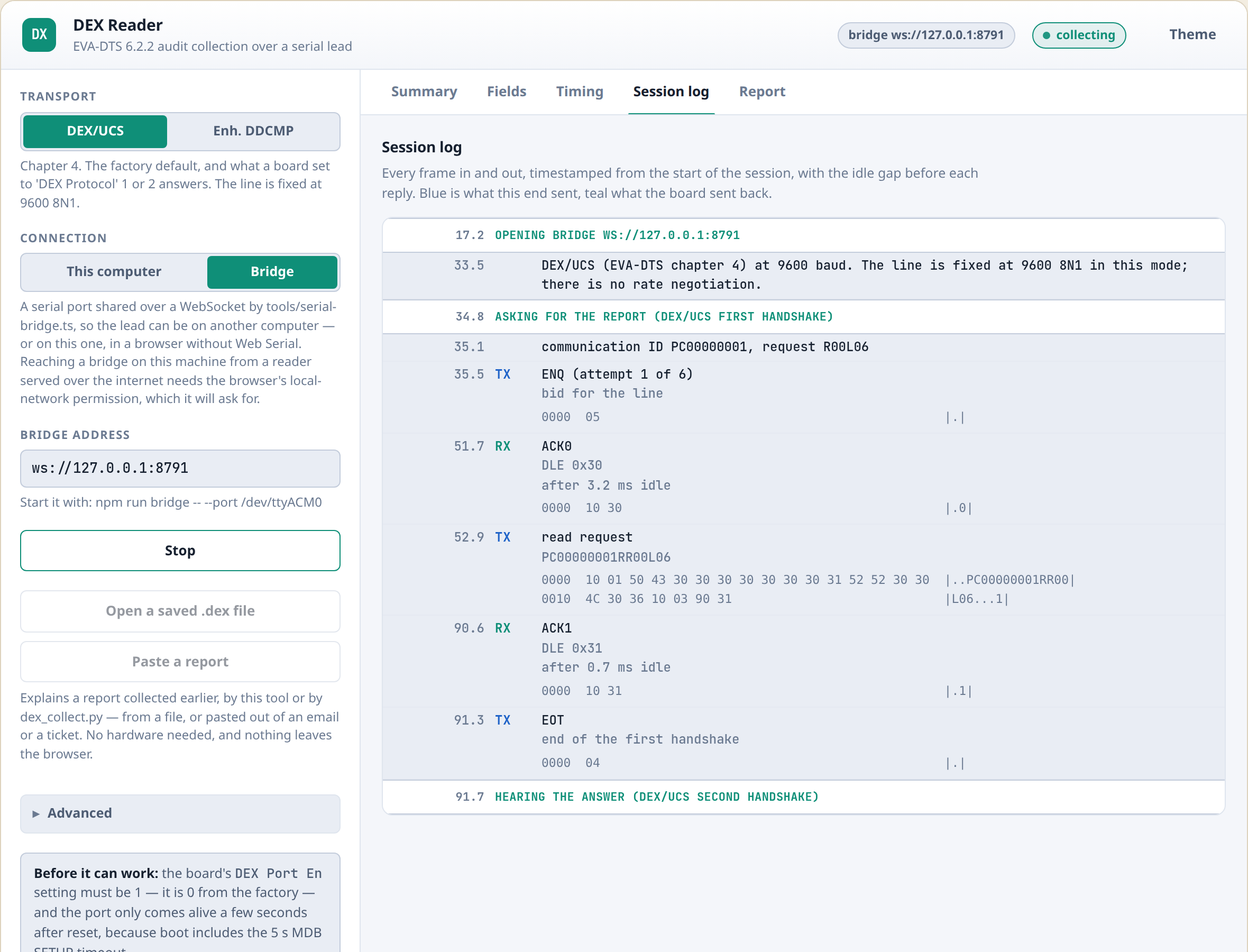
The log streams while it runs, so you can see the machine answering rather than watching a spinner — which matters, because a report over a 9600 baud line is not instant and a machine that has stopped talking looks exactly like one that is being slow.
The summary an operator actually wants
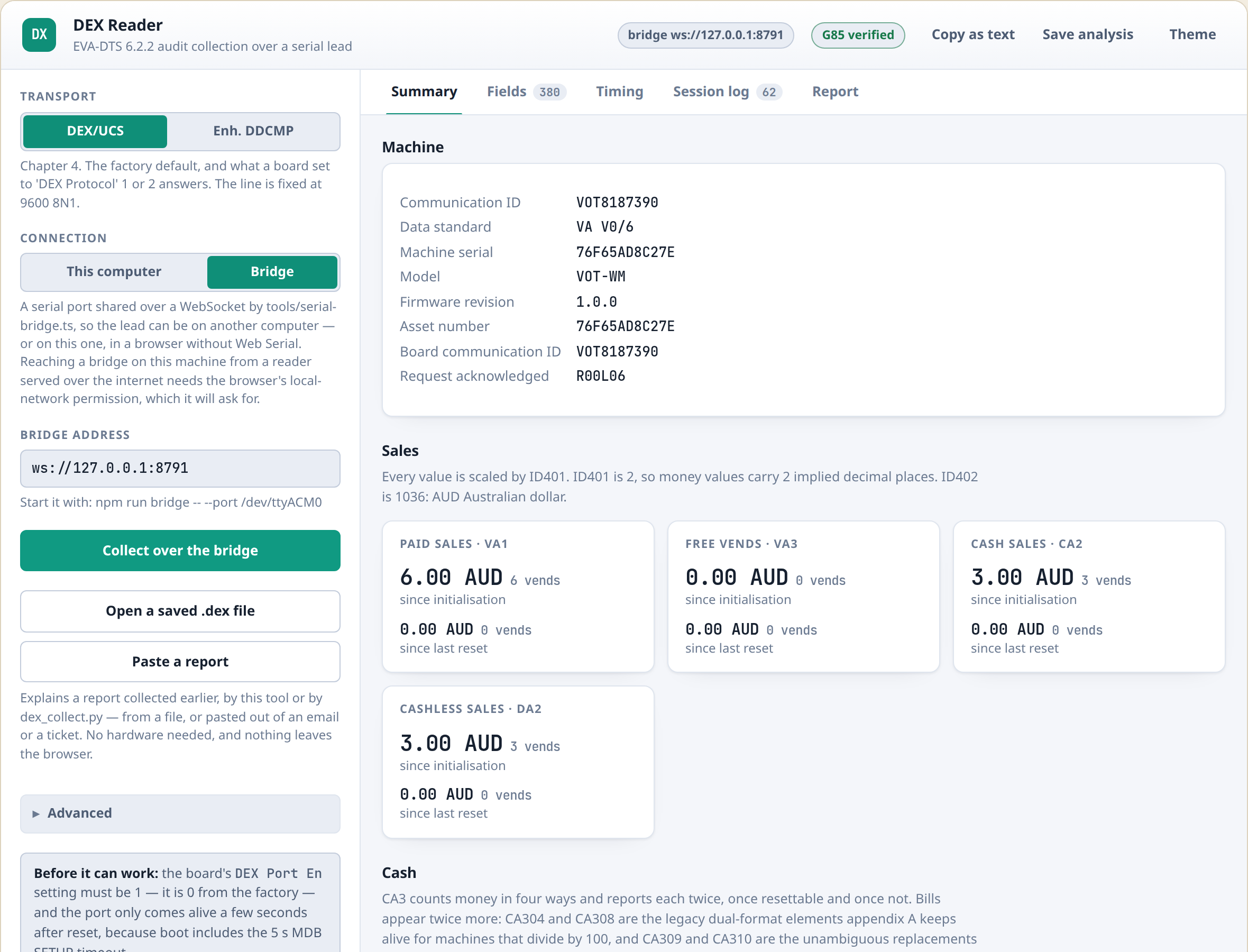
Machine identity, what it has sold since it was commissioned and since the last reset, cash in and cash out, and a line for every selection with its price, its vend count and its takings — split by which payment device took the money. Money is scaled by the machine’s own decimal setting and labelled with its own currency, rather than shown as raw digits you have to divide in your head.
Every field, named against the standard
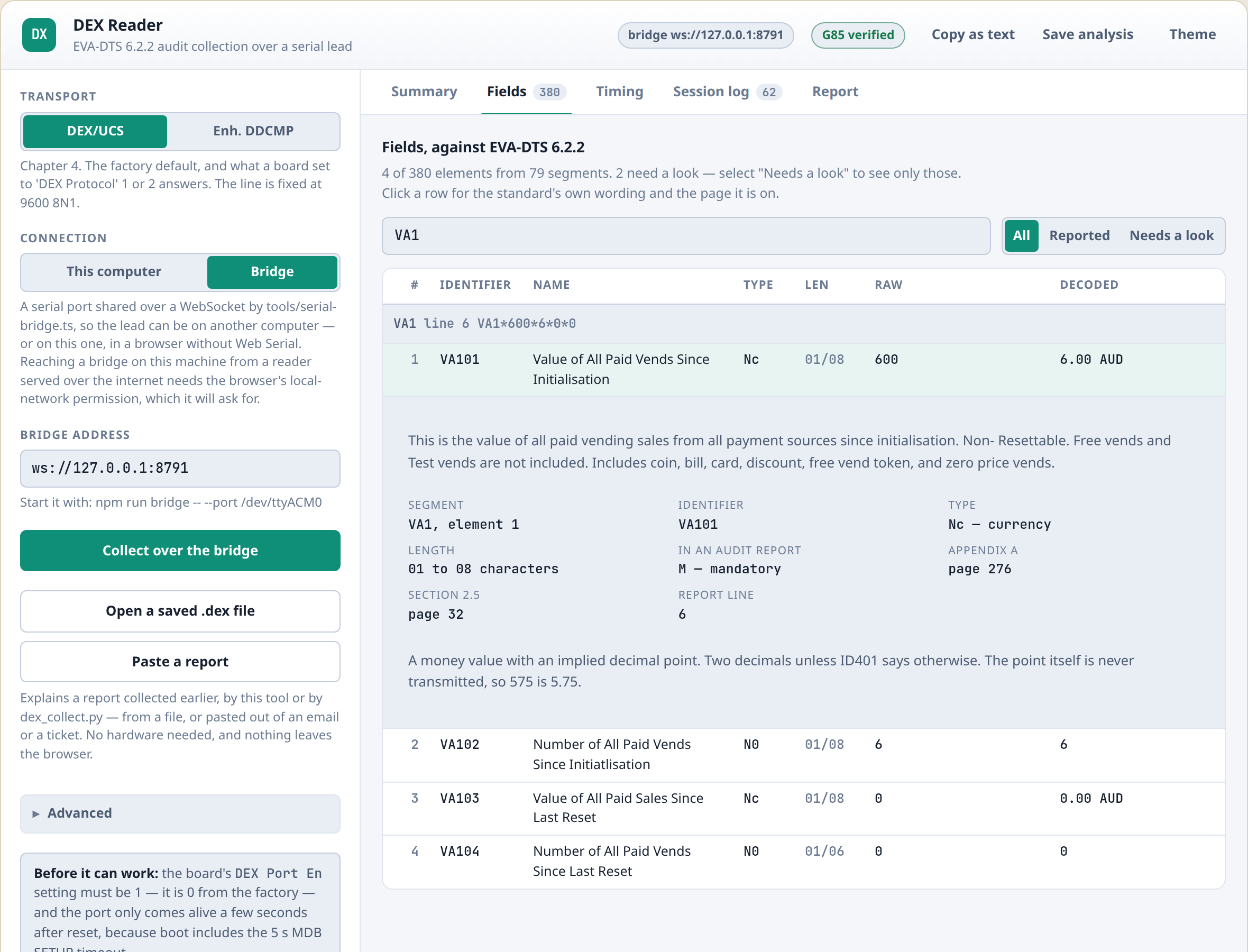
This is the part we built it for. Every element in the report is looked up in the EVA-DTS 6.2.2 data dictionary: what segment it belongs to, what position it holds within that segment, what the standard says it means, what type and length it should be, and which page of the specification to find it on. Click a row and you get the standard’s own wording.
The dictionary is not typed in by hand. It is extracted directly from the published specification — 695 elements and 416 event codes — so it says what the standard says, not what we remember it saying. Where a manufacturer has added a segment of their own, the reader shows it and states plainly that the standard does not define it, rather than guessing.
The timing of the exchange
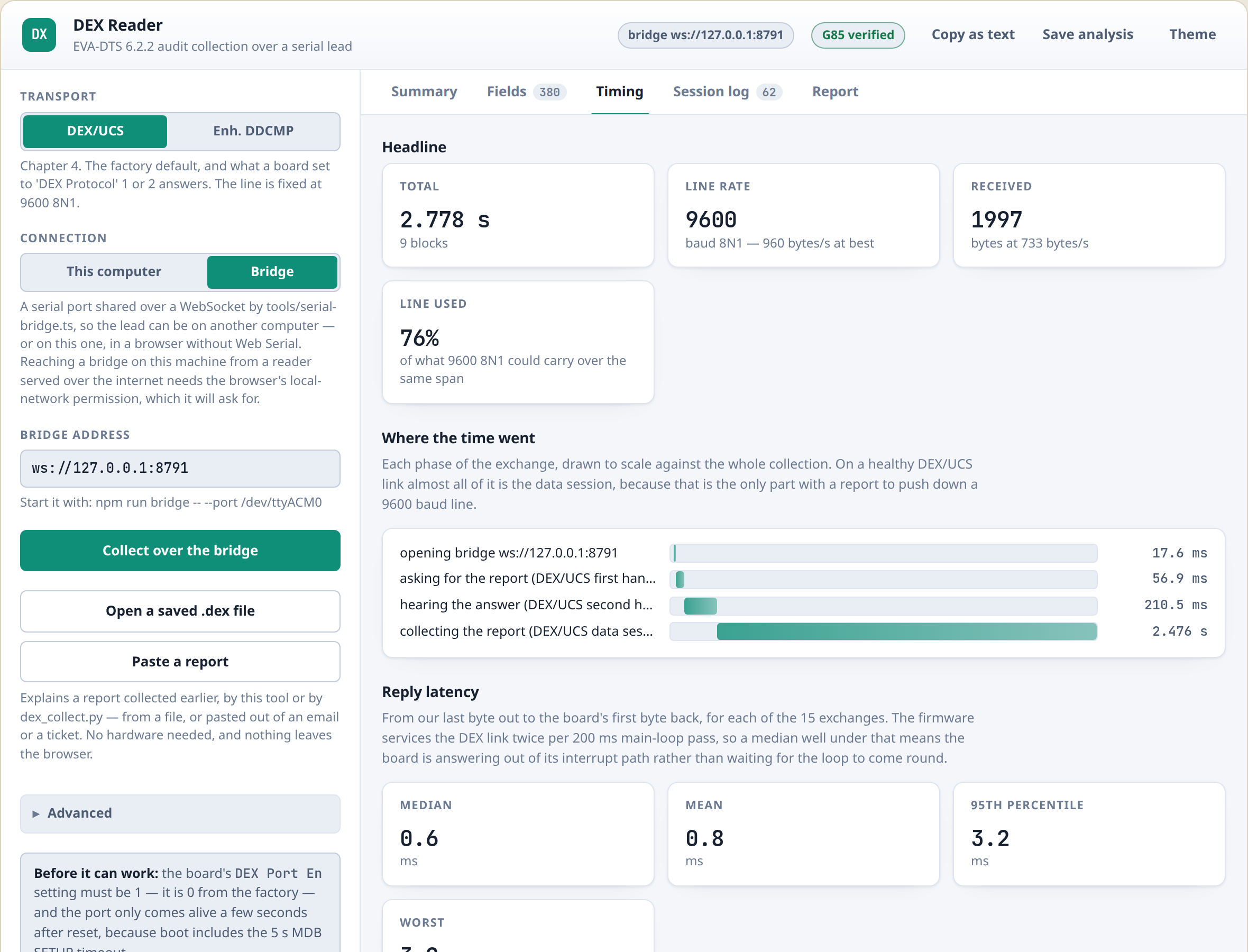
Every frame in and out of the port is timestamped. You can see how long the machine took to answer each request, how close each reply ran to the protocol’s own timeout, and what throughput the link actually achieved against what the baud rate allows. When a DEX collection is slow, or works on the bench and fails in the field, the answer is nearly always somewhere in this view.
And the raw exchange, byte for byte
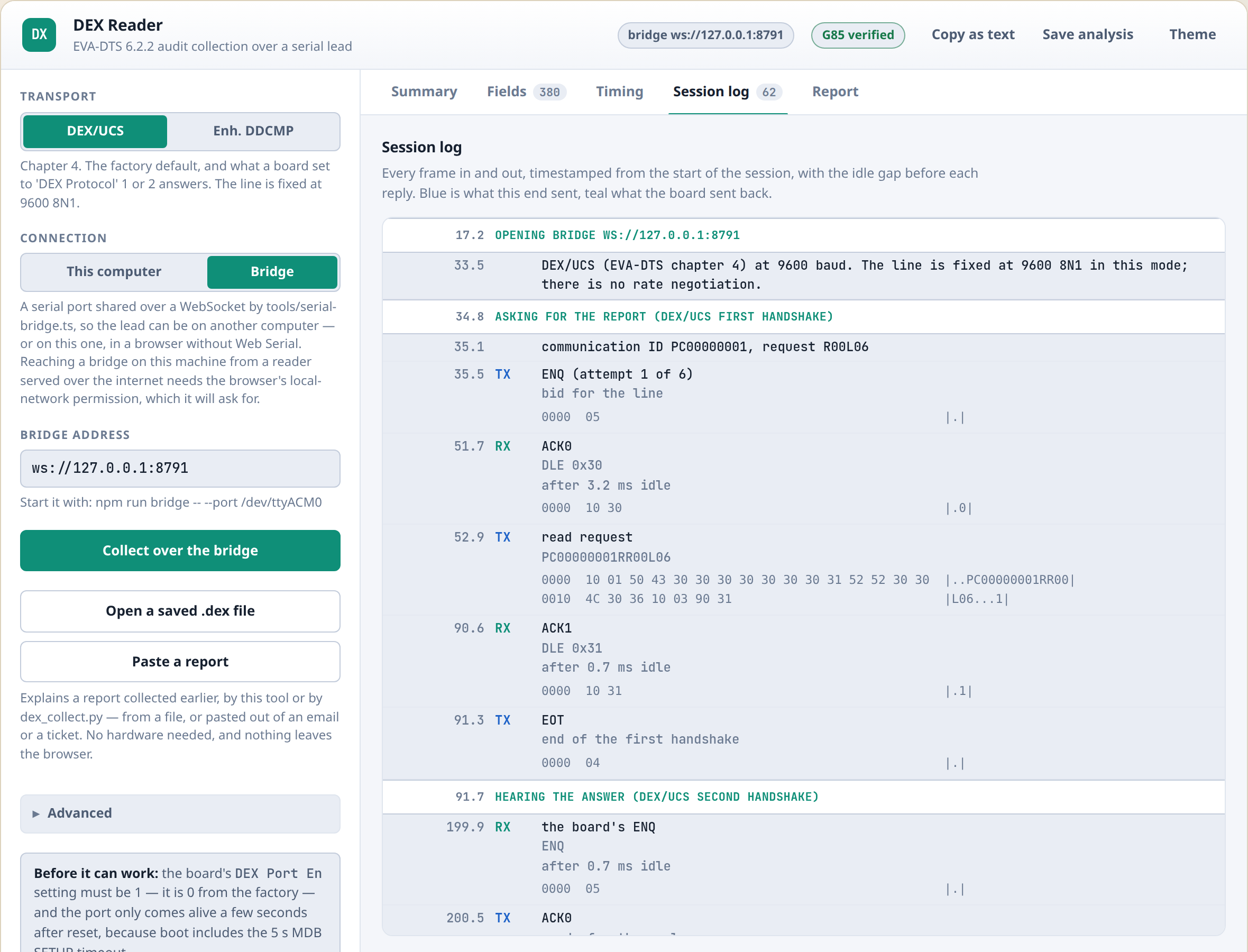
For anyone implementing DEX rather than just reading it: the complete conversation, in order, with hex dumps, idle gaps and every control character named. This is what you want open when your own equipment is answering with something the other end does not like.
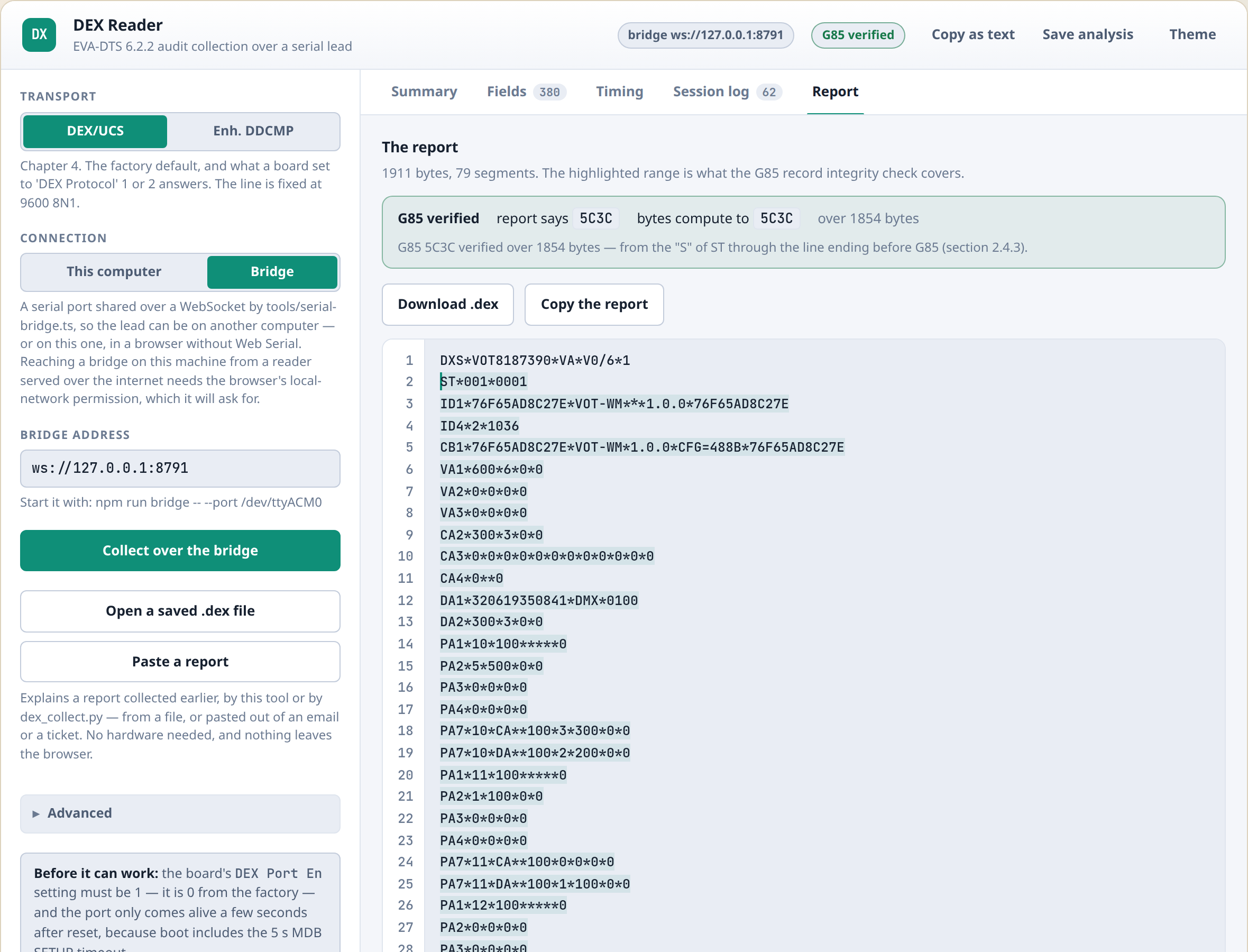
And the report itself, as the machine sent it, with the G85 check recomputed over it — ready to
copy out or save as a .dex file:
Both protocols
EVA-DTS defines two ways to get a report out of a machine, and the reader speaks both.
DEX/UCS (chapter 4) is the older and simpler one — fixed at 9600 baud, an ENQ to bid for the
line, then a series of DLE-framed blocks acknowledged alternately. Enhanced DDCMP (chapter 3)
adds a negotiated baud rate, an eight-byte header on every message and a much richer set of error
responses. Pick the one your equipment uses; the decode that comes out is identical.
Either way the reader verifies the G85 segment, the CRC-16 the machine puts at the end of the report over everything before it. A verified G85 means every byte arrived as the machine sent it. It is the first thing to check when a report looks wrong, and the reader puts the result in its header where you cannot miss it.
No lead? Open the file — or just paste it
If somebody has sent you a .dex file — from a telemetry platform, from a handheld, from us — you
can open it in the same page and get the whole decode with no hardware at all. Everything except
the timing view works exactly the same, because there was no exchange to time.
More often, though, a report arrives as text: quoted in an email, pasted into a support ticket, sitting in a portal’s log view. Press Paste a report and paste it straight in.
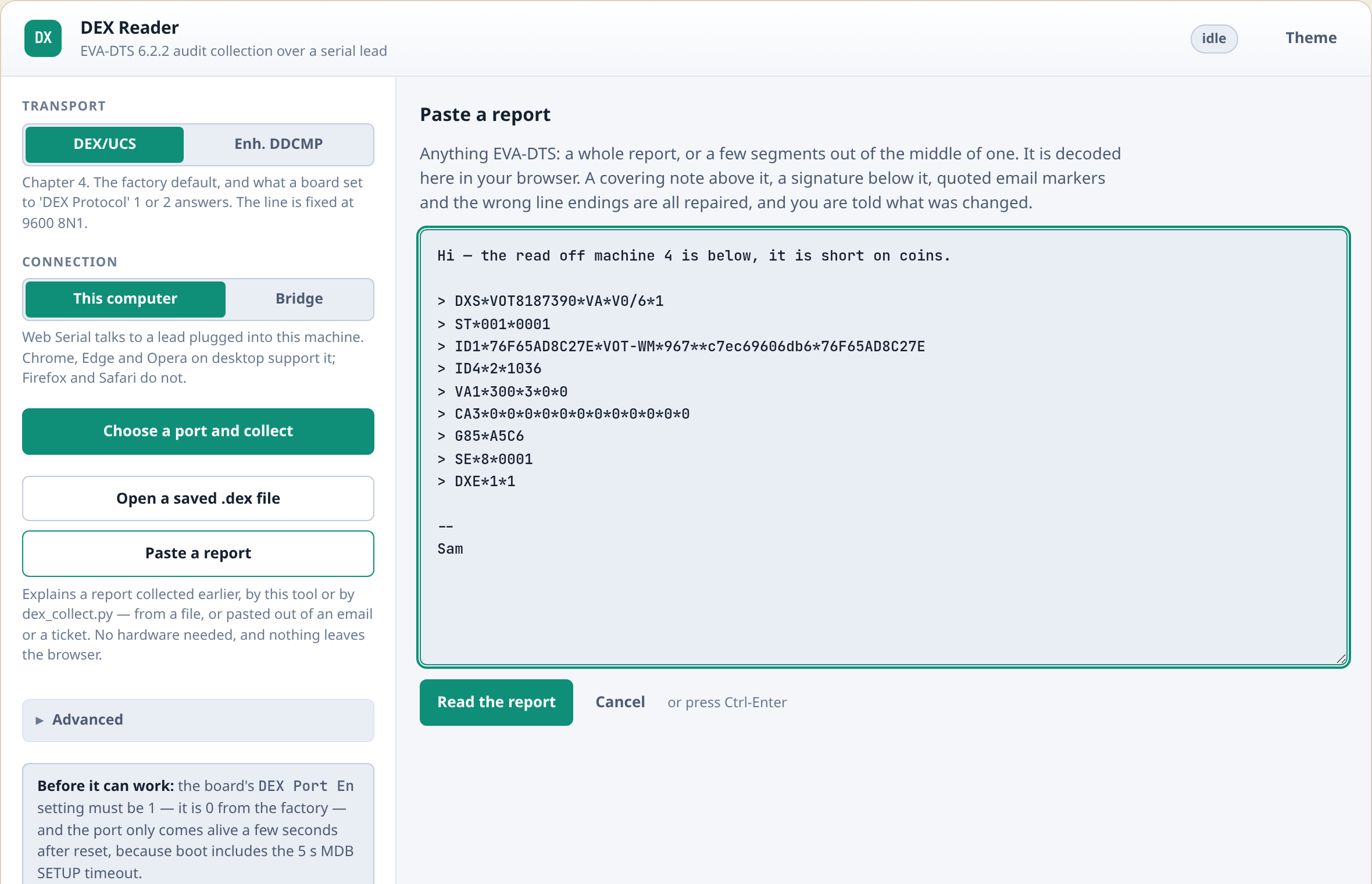
Text that has been through a mail client arrives a bit mangled, and none of that is your fault. A
covering line above the report, a signature below it, a > on every line, the wrong line endings,
indentation from a code block — all of it is repaired, and the page lists what it changed next
to the result rather than quietly rewriting your text.
One thing it will not touch is anything between ST and G85. That is the range the integrity
check covers, so repairing inside it would either invent a corrupt report or hide a real one. Both
of those look exactly like a working tool, which is the worst kind of bug to ship.
What we ask, and what we do not
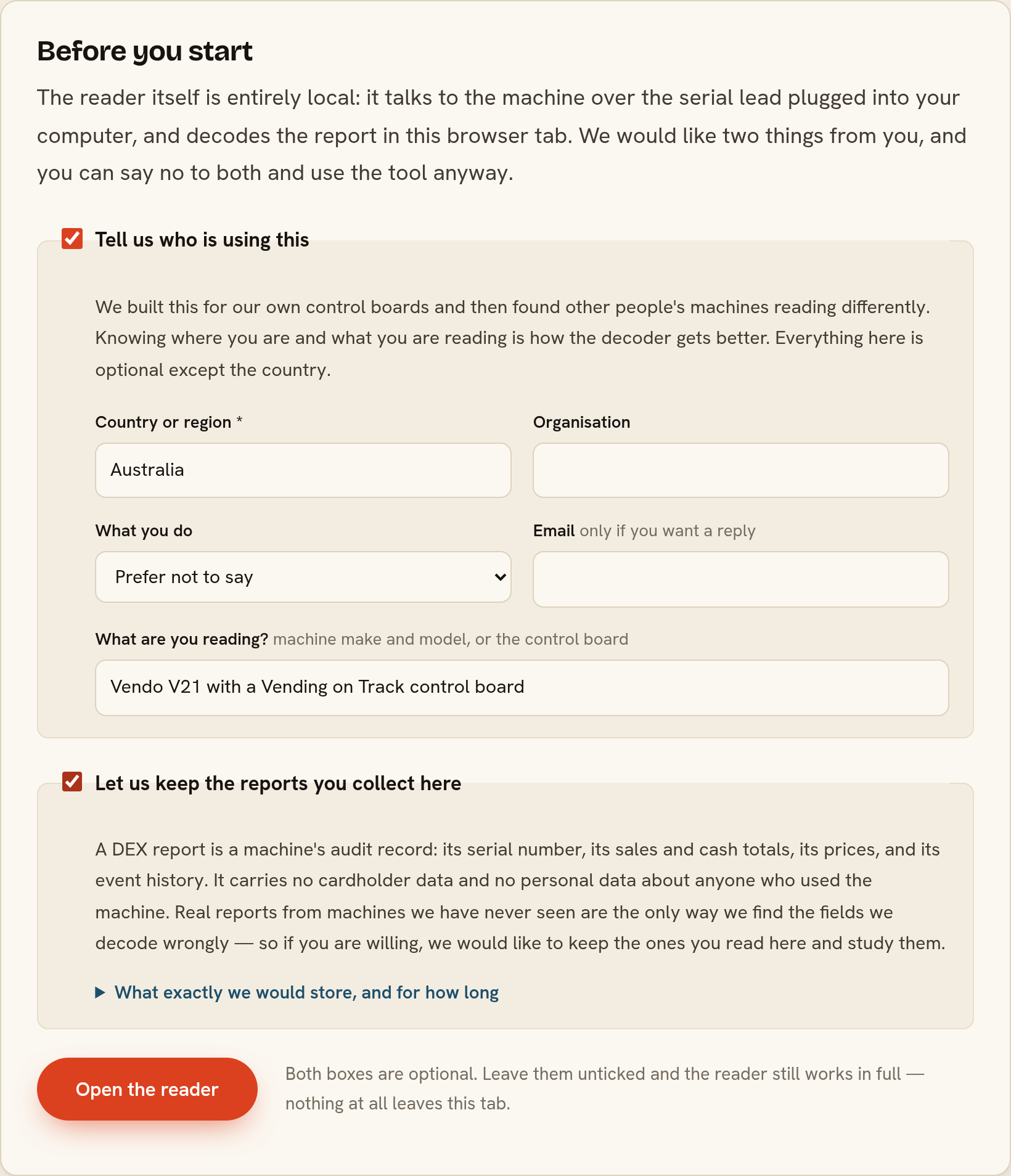
The reader is entirely local. It talks to the machine over your serial lead and decodes the report in your browser tab; nothing is transmitted to us by default and there is no account to create.
Above the tool there are two boxes, both off, and you can leave them off and use it in full. One asks who you are and what you are reading. The other asks whether we may keep the reports you collect. We ask because our decoder was built against our own control boards, and every report we have seen from equipment we do not make has taught us something — a field we scaled wrongly, a manufacturer segment we had never met. A DEX report is a machine’s own audit record: no cardholder data, nothing about anyone who used the machine. If you open a saved file rather than reading a machine, we do not even take the file name, because file names have customers in them.
Why we are giving it away
Our business is vending telemetry and the management system behind it: machines reporting themselves on a schedule, automatically, into live inventory and route plans — see our note on real-time DEX collection for how that works when it is not a person with a laptop. Reading one machine by hand with a serial lead is what you do when something has gone wrong, or when you are building the thing that will do it automatically. We needed a good tool for that and there was not one, so now there is.
It is the same code we test against a real control board on every change, and it is the same code that runs in our own workshop.
Frequently asked questions
Where do I find the DEX reader?
At vendingontrack.com/dex-reader. It is free, there is nothing to install and nothing to sign up for.Do I need special hardware to read DEX?
To read it off a machine, a USB-to-serial lead with the right plug for the machine’s DEX port — usually a 3.5 mm or 6.35 mm jack, sometimes a DB9. Nothing else; the reader speaks the protocol itself, so you do not need a dedicated DEX handheld. If you already have the report — as a.dex file or just as text — you need no hardware at all: open it or paste it in.
Can I paste a DEX report instead of uploading a file?
Yes. Press Paste a report, paste the text and read it. It copes with a report that has been through an email or a ticket — a covering line above it, a signature below it, quoted> markers and the wrong line endings are all repaired, and the page lists exactly what it changed. Nothing between ST and G85 is touched, so the integrity check still means what it says.
Does the report get uploaded anywhere?
Not unless you ask us to. The reader decodes the report in your own browser and the page sends nothing by default. There is a box you can tick if you are willing to let us keep the reports you collect, because real reports from machines we have never seen are how we find the fields we decode wrongly — but it is off until you turn it on, and the tool works identically either way.Which browsers work?
Reading from a machine needs the Web Serial API: Chrome, Edge and Opera on desktop. Opening a saved.dex file works in any browser, including on a phone. For a browser without Web Serial there is a small bridge program you run yourself; because the page is served from the internet and the bridge is on your machine, Chrome will ask permission for local-network access the first time.